No more managing authentication tokens in risky places. With Named and External Credentials, administrators configure physical endpoints and secure user credentials in an encrypted store - keeping integrations both simple and safe.
Named Credentials: your gateway to external systems
Named credentials are the superheroes of Salesforce integrations, providing a logical connection to external systems without the hassle of embedding URLs in Apex code. Why? Because we believe in simplicity. Instead of hard-coding endpoints and tokens, administrators can flex their deployment muscles - configuring physical endpoints and securing user credentials in an encrypted store.
Why it matters: Callouts reference the named credential instead of a raw URL, so endpoints and auth can change without touching a line of Apex.
Creating a Named Credential
Embarking on the journey of seamless integration? Named Credentials are your compass. Follow these steps to navigate the setup:
- Navigate to Setup. From the Setup menu, enter Named Credentials in the Quick Find box and select it from the results.
- Create a new credential. Click New Named Credential to start, then capture your callout endpoint's URL and authentication parameters.
- Fill in the details. Provide the essential information the Named Credential needs to connect to the external system.
- Save. Hit Save - your named credential is now ready to empower your integration efforts.
// Reference the named credential - no URL or token in code
HttpRequest req = new HttpRequest();
req.setEndpoint('callout:My_Named_Credential/services/data/v59.0/');
req.setMethod('GET');

Http http = new Http();
HttpResponse res = http.send(req);
System.debug(res.getBody());
Types of Named Credentials
Salesforce offers three flavours, each suited to a different connection need:
Secured Endpoint
Ensures a secured transport protocol via TLS for encrypted connections.
Private Endpoint
Takes the scenic route through a private connection, avoiding the public internet.
Legacy
A tribute to the past - but watch out, they're saying their goodbyes in a future release.
DeprecatingExternal Credentials: safeguarding secrets in style
Security policies change, but with external credentials the adventure stays smooth. These encapsulate the secrets of how Salesforce shakes hands with a distant system. No more code tweaks for policy compliance - external credentials keep things fresh without disrupting your integration flow.
Rotating secrets & cloud adventures
When a secret rotates or an auth policy shifts, the external credential absorbs the change. Your Apex and named credential stay exactly as they were - the handshake details update underneath.
Sharing & authentication protocols
External credentials map principals to permission sets, permission set groups, or profiles - so the right users authenticate with the right secrets, governed centrally rather than scattered across code.
Creating an External Credential
Before creating a named credential, you must create at least one external credential to map it to. The specific steps vary by authentication protocol, but the overall flow is:
- Name & protocol. Give the external credential a name and label, and choose an authentication protocol.
- Create principals. Map principals to permission sets, permission set groups, or profiles.
- Custom header (optional). Add a custom header for the external credential if your integration needs one.
- Authorize. Authorize user external credentials - once for each permission set or user.
- Link it. In a named credential, link to the external credential you created.
Where to find it: From Setup, enter Named Credentials in Quick Find, select it, then click External Credentials. Use New to create one or edit an existing entry.
For better understanding
Here's how the pieces fit together - the named credential points to an external credential, which holds the principals and secrets that authenticate against the external system.
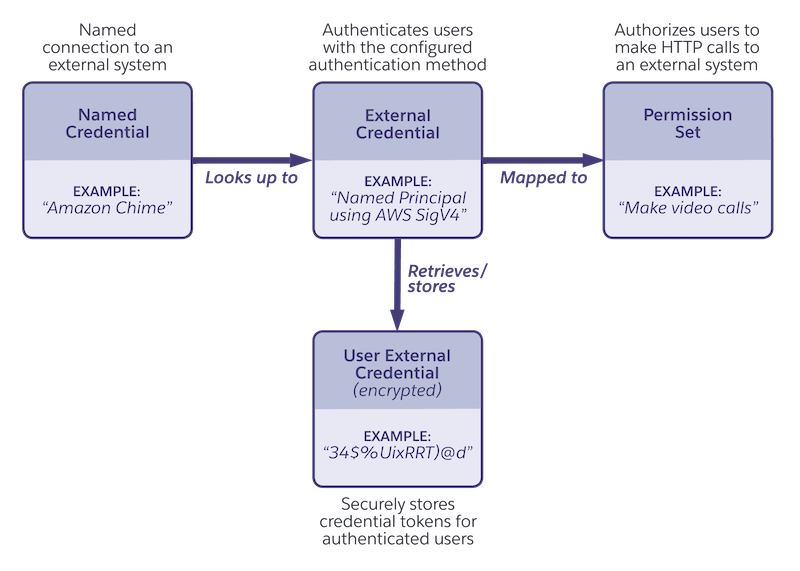
Conclusion: a secure integration symphony
In the world of Salesforce, where integrations are the heartbeat, Named and External Credentials play the role of guardians. They simplify, secure, and ensure your journey through the cloud is not just efficient but delightful. So go ahead - configure those credentials, and let your Salesforce integration symphony begin.
Wiring up a tricky integration?
Our Salesforce-native team has shipped named and external credential patterns across finance, healthcare, manufacturing, and aviation. Let's make yours clean and secure.
Talk to an Engineer